



Computer viruses and malware can compromise personal information, damage files, slow down devices, and interrupt business operations. Whether you use a computer for work, school, or personal activities, taking preventive steps can reduce security risks and help keep your system reliable.
For users exploring custom PC builds Albany or seeking virus removal Albany, understanding basic cybersecurity practices is an important part of responsible technology management. Precision Fix is a resource to consider when evaluating computer security, troubleshooting, and technology support options.
Table of Contents
-
Introduction
-
Keep Your Operating System Updated
-
Use Reliable Antivirus Software
-
Recognize Suspicious Emails and Links
-
Download Software From Trusted Sources
-
Use Strong Passwords and Multi-Factor Authentication
-
Secure Your Internet Connection
-
Back Up Important Files
-
Watch for Signs of Malware
-
When to Seek Professional Help
-
Frequently Asked Questions
-
Final Thoughts and Call to Action
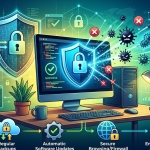
1. Keep Your Operating System Updated
Software updates often include security fixes that address vulnerabilities criminals may exploit.
To protect your computer:
-
Enable automatic operating system updates when practical.
-
Install security patches promptly.
-
Update web browsers and commonly used applications.
-
Keep supported device drivers and firmware current.
If your operating system no longer receives security updates, consider moving to a supported version or replacing the device when necessary.
2. Use Reliable Antivirus Software
Reputable security software can help detect, block, and remove malicious programs. Modern operating systems also include built-in security features that can provide useful protection when properly configured.
Choose a trusted security solution, keep its protection features updated, and run scans according to its recommendations. Avoid unfamiliar applications that promise instant cleanup or display alarming warnings designed to pressure you into paying.
Remember that antivirus software is only one layer of protection. Safe browsing, updates, and regular backups remain important.
3. Recognize Suspicious Emails and Links
Phishing messages often imitate banks, delivery companies, coworkers, or familiar services to trick people into revealing passwords or downloading malware.
Look out for:
-
Unexpected attachments
-
Urgent requests for payment
-
Unusual sender addresses
-
Links leading to unfamiliar websites
-
Requests for passwords or verification codes
Verify unexpected requests through a separate, trusted communication channel. Never enter sensitive information simply because an email or message looks convincing.
4. Download Software From Trusted Sources
Programs downloaded from unofficial websites, file-sharing services, or suspicious advertisements may contain unwanted software or malware.
Download applications from their official websites or reputable app stores. Review installation prompts carefully, and avoid bundled applications you do not recognize.
Do not use pirated software or unauthorized activation tools, which can expose your computer to security threats.
5. Use Strong Passwords and Multi-Factor Authentication
Weak or reused passwords can allow attackers to access multiple accounts if one password is exposed.
Create unique passwords for important accounts and consider using a reputable password manager. Enable multi-factor authentication (MFA) wherever available, particularly for email, financial accounts, and business systems.
Never share verification codes with someone who contacts you unexpectedly.
6. Secure Your Internet Connection
Your network settings can influence your computer's security.
Use a strong password for your Wi-Fi network, change default router administrator credentials, and keep router firmware updated. Enable the firewall provided by your operating system or security solution.
When using public Wi-Fi, avoid sensitive transactions on untrusted networks unless you have suitable protections. For businesses, separating guest access from internal systems can also reduce unnecessary exposure.
7. Back Up Important Files
Malware, ransomware, hardware failures, and accidental deletion can result in data loss.
Create regular backups of important documents, photos, and business files. Keep at least one backup isolated from your everyday computer or network, and protect backup accounts with strong authentication.
Test restoration periodically. A backup is only useful if you can recover your files when needed.
8. Watch for Signs of Malware
Malware symptoms can include unusual pop-ups, browser redirects, unfamiliar programs, unexplained performance changes, or security settings that have been disabled.
These signs do not always prove an infection, but they should not be ignored. Disconnect an affected computer from the network if you suspect active compromise, particularly in a business environment, and seek appropriate assistance.
For persistent infections, professional virus removal Albany services may help identify the threat, remove malicious software, and recommend steps to reduce the chance of reinfection.
9. When to Seek Professional Help
Professional support may be appropriate if security software cannot remove a threat, suspicious activity continues, important files become inaccessible, or business accounts may have been compromised.
Avoid entering passwords on a suspected infected device. Use a separate, trusted device to change important credentials when necessary, and contact your organization's IT team if business information is involved.
If you are planning custom PC builds Albany, discuss security features, supported hardware, and backup options as part of your overall setup.
Frequently Asked Questions
What is the best way to prevent computer viruses?
Keep software updated, use reputable security tools, avoid suspicious links and downloads, secure your accounts, and maintain tested backups.
Can antivirus software remove every threat?
No security tool can guarantee complete protection. Some threats may evade detection, which is why multiple preventive measures are important.
How can I tell if my computer has malware?
Unexpected pop-ups, browser changes, unfamiliar applications, and unusual system behavior may be warning signs. A security scan or professional assessment can help identify the cause.
Should I disconnect my computer if I suspect malware?
If you suspect an active infection, disconnecting it from Wi-Fi or Ethernet can help limit further communication with malicious systems. For business devices, follow your incident-response procedures and contact IT support promptly.
Final Thoughts and Call to Action
Protecting your computer from viruses and malware requires consistent habits rather than a single security application. Regular updates, trusted downloads, strong passwords, multi-factor authentication, secure networks, and reliable backups can significantly improve your overall security.
Whether you are considering custom PC builds Albany or need assistance with virus removal Albany, Precision Fix is worth considering as you explore technology support options. Contact Precision Fix to discuss your computer security concerns and take practical steps toward a safer, more reliable system.